


You’ve worked hard to create SEO-friendly, user-focused content, but instead of higher rankings, multiple pages compete for the same keyword. Your best content gets buried, visitors land on less relevant pages, and your rankings and conversions take a hit.
Keyword cannibalization happens when your content works against you. It confuses search engines, dilutes your authority, and hurts your rankings.
In this article, I’ll show you how to identify and resolve keyword cannibalization issues so you can protect your rankings and drive more conversions.
What is keyword cannibalization?
Keyword cannibalization occurs when multiple pages on your site target the same keyword and search intent, creating confusion for search engines.
It makes it harder for search engine bots to determine the most relevant page, leading to lower-quality pages competing with your best content.
For example, imagine you search for email marketing on Google and find several blog posts from the same site targeting that keyword.
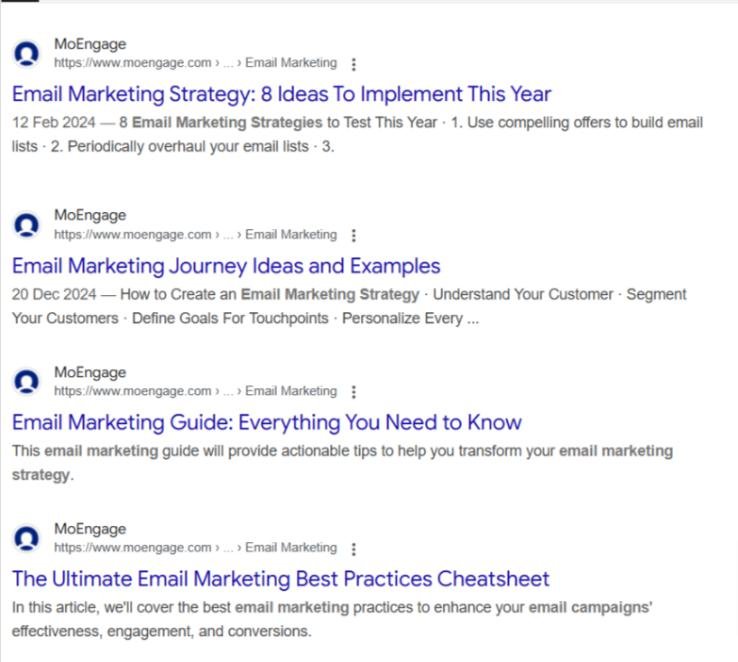
Which one would you click?
This overlap creates competition between the site’s pages, causing fluctuations in search rankings and frustrating users.
It’s important to note that keyword cannibalization doesn’t happen by coincidence.
- Optimize multiple pages for similar keywords that fulfill the same search intent
- Fail to consolidate outdated pages after publishing newer ones
- Publish similar content repeatedly
- Mismanage e-commerce product and category page optimization
Why is keyword cannibalization bad for SEO?
Here’s how keyword cannibalization negatively impacts your site:
Decreased organic rankings and traffic
When multiple pages target the same keyword, search engines struggle to identify the most relevant page to rank. This leads to keyword ranking fluctuations, reducing traffic to your best-performing pages.
Wasted crawl budget
Search engines allocate a crawl budget for each site, limiting the number of pages bots can crawl before indexing. According to Google, duplicate content can waste this budget.
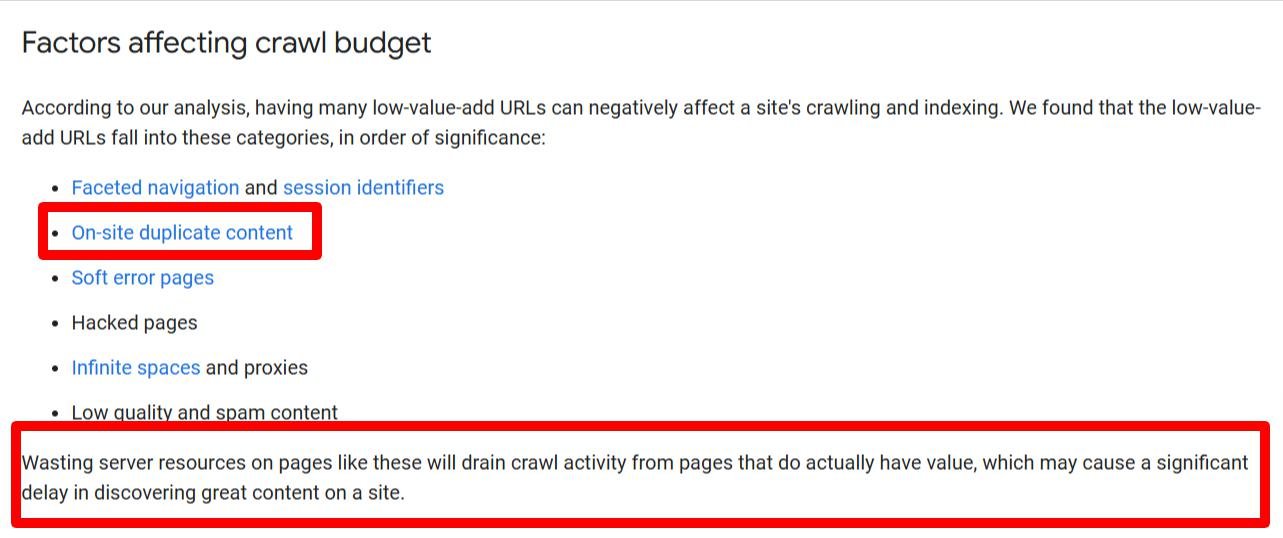
When keyword cannibalization occurs, bots repeatedly crawl cannibalized pages, delaying the indexing and ranking of more important pages and harming your site’s overall performance.
Loss of valuable internal link equity
Internal links help search engines understand the relationship between pages and are a key ranking factor. However, when multiple pages target the same keyword, internal link equity (the value passed through internal links) becomes fragmented.
For example, two Semrush blog posts target and rank on Google search result pages for “SEO trends in 2024.”


Any internal links with the anchor text “SEO trends in 2024” must be divided between the two pages. This fragmentation reduces the authority signal passed to the preferred page, potentially lowering its ranking. Readers following internal links to a less relevant page may have a poor experience, increasing bounce rates.
Difficulty identifying underperforming pages
Keyword cannibalization spreads traffic across multiple pages, making it harder to identify which ones are underperforming. The overlap prevents you from spotting opportunities to optimize the page that could deliver the best results.
When keyword cannibalization isn’t an issue
Not all cases of multiple pages ranking for the same keyword are problematic. For instance:
Different search intent
Example: Saleshandy has multiple pages ranking for “cold email guide.”
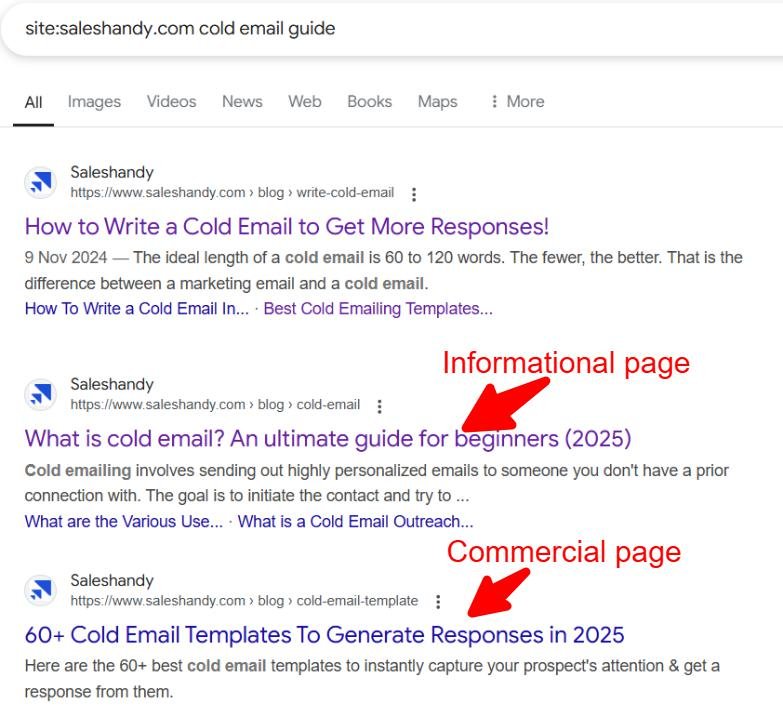
One provides general information about cold emails, while another offers cold email templates. Since the pages fulfill different intents, there’s no conflict.
Targeting different locations
Example: McDonald’s has separate landing pages for different countries, such as the UK, the US, and South Africa.
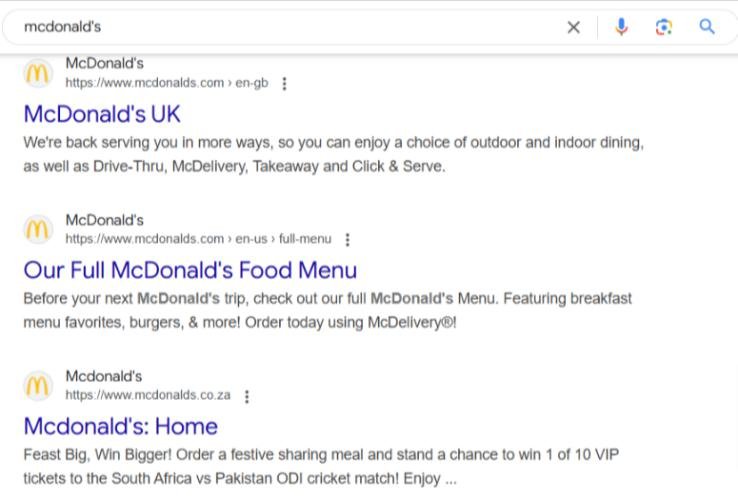
While these pages may rank for the same keyword, they serve distinct geographic locations, which is acceptable.
How to discover keyword cannibalization
Keyword cannibalization can appear as a minor problem but can make your SEO efforts fruitless. Let’s explore three steps to find these issues on your site:
1. Use Moz’s Pro Keyword Explorer tool
Moz Keyword Explorer is a keyword research tool that analyzes your search rankings to identify potential keyword cannibalization. You’ll need a Moz Pro subscription to access this tool, but you can try it out with a free trial.
A key differentiator is that you don’t have to import keywords to discover cannibalization issues on your site. Keyword Explorer automatically fetches your ranking keywords and shows you the keywords with multiple-page rankings.
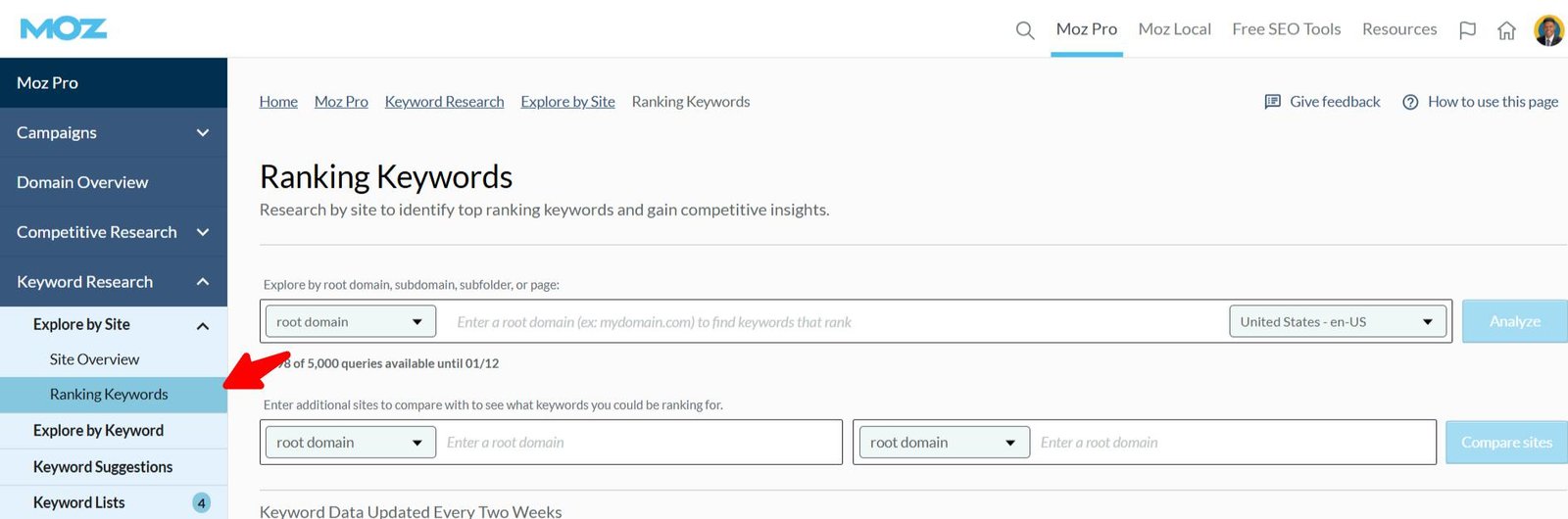
To check cannibalization issues, sign in to your Moz Pro account and go to Keyword Explorer. Under the Keyword Research menu, click the drop-down beside Explore by Site and select Ranking Keywords.
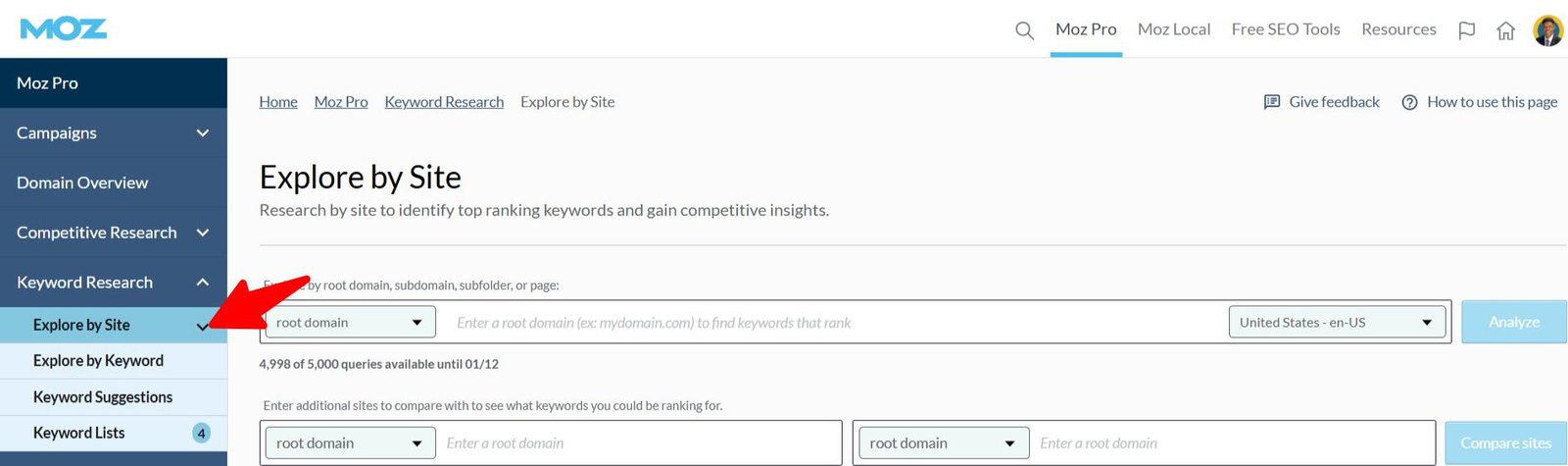
Click “Ranking Keywords”to see your keyword rankings.
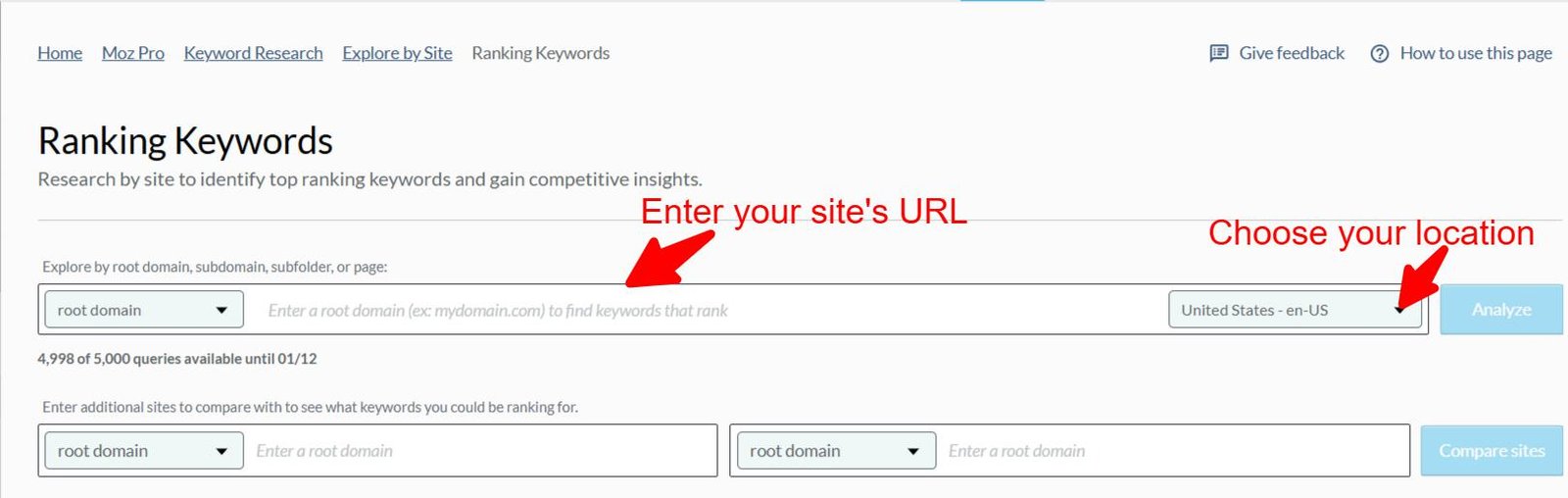
Enter your website’s URL in the root domain bar, choose your location, and click Analyze.
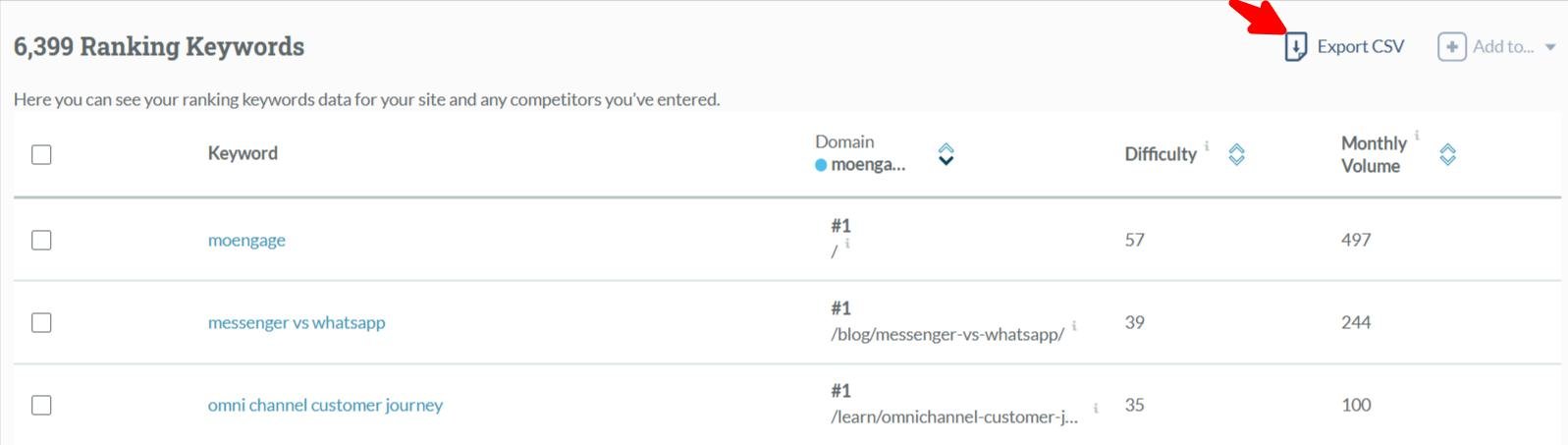
The result shows all your keyword positions, ranking page URLs, search difficulty, and search volume.
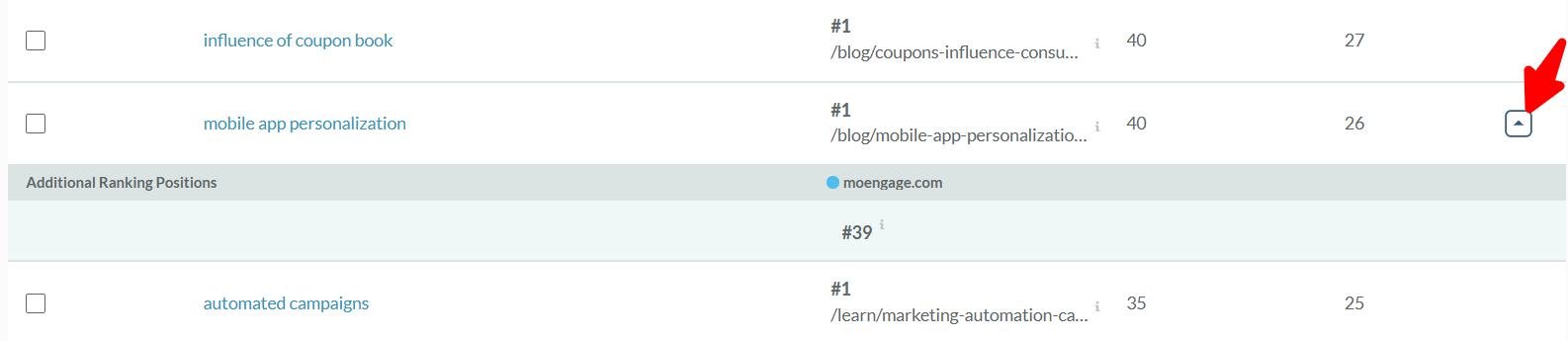
Pro tip: Any keyword with a drop-down icon on the right indicates multiple pages are ranking for that keyword. Click the icon to view the additional ranking pages.
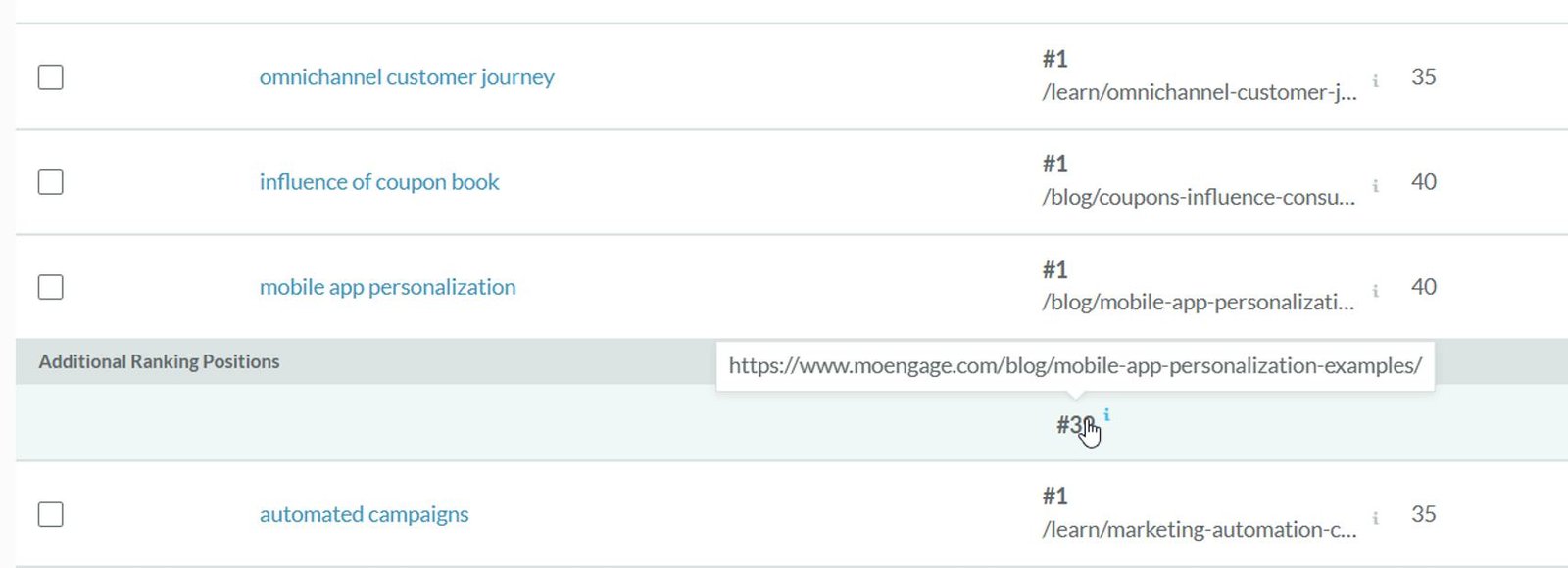
Click the additional page position to see its URL.
Finally, click the“Export CSV icon”to download the data as a CSV file for offline analysis.
Note: Multiple-page rankings don’t always indicate keyword cannibalization. Carefully review the additional pages to ensure they don’t target the same search intent as the main page.
Find weak spots and quick wins in your SEO strategy with Moz

2. Check Google Search Console
Google Search Console is a free SEO tool that helps site owners monitor and optimize their organic performance. You can use it to identify potential keyword cannibalization issues by analyzing which pages rank for the same keywords.
Here’s how to check for keyword cannibalization using Google Search Console:
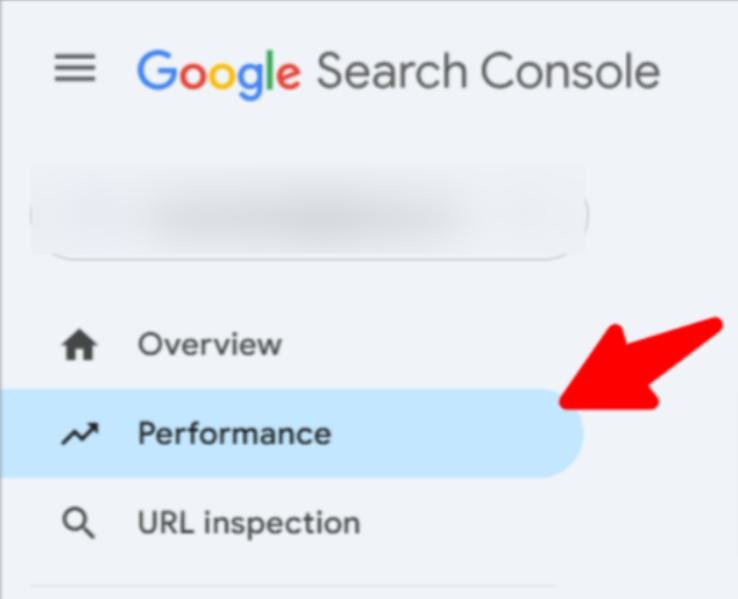
Log into your Google Search Console account and click the Performance menu.
Scroll down and click Queries to view the keywords generating impressions and clicks for your site. Click on any keyword you want to analyze for keyword cannibalization. This will create a query filter with the selected keyword at the top of the page.
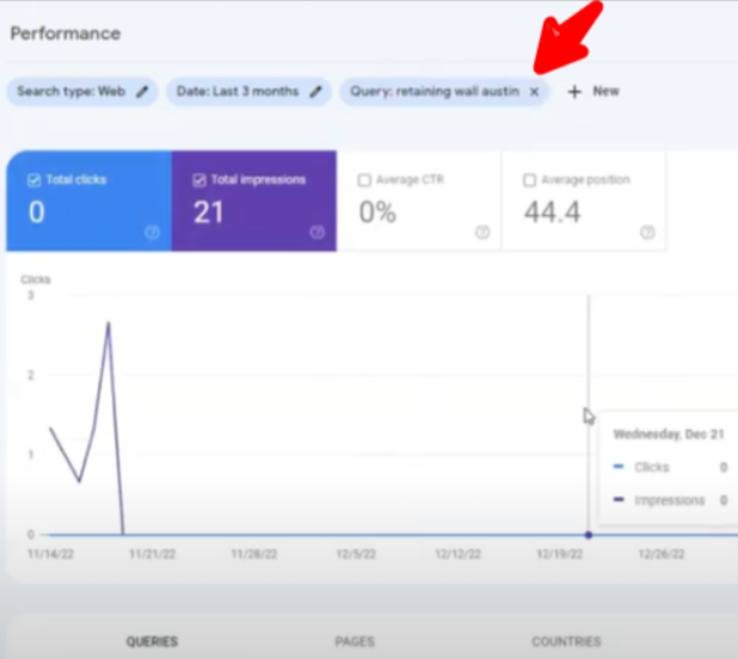
Pro tip:If you can’t find the keyword you want to analyze, use the custom query filter to check multiple related keywords at once:
Click +Add filterat the top of the page, then select Query.

Under the filter menu, click the drop-down icon and select Exact query. Enter the keyword(s) you want to analyze and click Apply.

Scroll down to the Pages tab to see which pages are ranking for the keyword.

If multiple pages generate impressions and clicks for the same keyword, this could indicate keyword cannibalization. Manually review the pages to confirm if they target the same search intent. If they do, you’ll need to resolve the cannibalization issue to improve your rankings.
3. Use the site search operator
You can discover keyword cannibalization issues on search engine result pages using the site search operator “site: your domain keyword.”
For example, I used the site search operator “site:moengaege.com email marketing strategy” to discover pages targeting the keyword “email marketing strategy”.

Interestingly, this strategy works on Bing, too.

Pro tip:A site search collates all pages on your site mentioning a keyword. You should manually check the results to identify pages optimized for the keyword with similar search intent.
How to fix keyword cannibalization
Here are five ways to solve keyword cannibalization without hurting organic performance:
Consolidate and redirect cannibalized pages
One of the most effective ways to fix keyword cannibalization is to consolidate or redirect the cannibalized pages to a single, authoritative page.
This approach combines the internal links and backlinks from multiple low-authority pages into one authoritative page. It also signals to search engines that the older pages have been replaced by a single, comprehensive page.
You don’t always need to create a new page. If one of the existing pages is already comprehensive, you can simply revamp it to make it more valuable.
Here’s how to choose the best page for consolidation:
Analyze ranking pages with Moz Rank Checker Tool
Use Moz’s Rank Checker tool to analyze the rankings of all the pages targeting the cannibalized keyword.

Enter the keyword and the URLs of each page to check their rankings. The page with the highest and most consistent ranking is likely the best candidate to keep or improve.
Consider the page that thoroughly satisfies the keyword intent
Search engines prioritize search intent. Check the page that answers the readers’ questions for that keyword.
Consider the page with the highest number of backlinks
The page with the highest backlink profile signifies it’s worthy of retaining. You can use Moz’sLink Explorer tool to analyze the backlinks of your cannibalized pages.

A few things to do after selecting the best page include:
- Take the best parts of the cannibalized pages to improve the quality and depth of your consolidated page.
- Set up 301 redirects from the cannibalized pages to the consolidated page.
- Follow Google’s recommendation when updating your XML sitemap to remove redirected URLs.
Remove toxic links before they hurt your rankings

Use Canonical tags
Canonical tags are an effective way to resolve keyword cannibalization without removing duplicate pages. They tell search engines which page should be indexed and ranked as the primary page, while keeping other related pages accessible to visitors.
Example:
Imagine you own an eCommerce website and have multiple pages targeting the keyword “best running shoes,” such as:
- Page A: A category page titled “Best running shoes for men and women”
- Page B: A product comparison page titled “Best Running shoes: pros and cons of popular brands”
These pages compete for the same keyword, causing keyword cannibalization. After reviewing both, you decide that Page A (the category page) is the most comprehensive and user-friendly. However, you still want visitors to access Page Bfor its product comparison information.
In this case, you can use canonical tags to resolve the issue:
Add a canonical tag to Page B’sHTTP header pointing to Page A:
<link rel=”canonical” href=”https://www.example.com/best-page”>
This tells search engines that Page A is the preferred page for indexing and ranking.
- Ranking signals from Page Bare consolidated into Page A, boosting its authority.
- Page A becomes the primary page ranking for “best running shoes.”
- Page B remains accessible to visitors but no longer competes in search results.
For more context, check out this guide on the best practices for canonical URLs.
3. Target different search intents for duplicate pages
If you don’t want to use canonical tags, you can resolve keyword cannibalization by revamping each page to target a different search intent.
Here are the main types of search intent to consider:
- Informational intent:The searcher wants to learn about a topic or find answers to specific questions.
- Navigational intent:The searcher is looking for a specific website or page.
- Commercial intent:The searcher is exploring options before making a purchase decision.
- Transactional intent:The searcher is ready to make a purchase or complete an action.

Example:
Let’s look at how Moz targets “keyword research.” They’ve created separate pages for each intent:
- An informational pagethat provides abeginner’s guide to keyword research.
- A navigational page for searchers looking to access Moz’s Keyword Explorer tool directly.
- A commercial page that compares different keyword research tools for users exploring options before purchasing.
Tip: When revamping pages, follow Google’s Helpful Content update to ensure your content aligns with user needs and performs well on SERPs. For more guidance, check out this guide on creating helpful content.
Want to avoid keyword cannibalization?
Optimize for search intent with Moz AI

4. Build links and optimize your preferred pages
You can use internal links, backlinks, and content optimization techniques to tell search engines the preferred page for a cannibalized keyword and increase its page authority.
- Add internal links from cannibalized pages to your preferred page, using the target keyword as the anchor text
- Audit your website and change any internal links with the same anchor text that point to other pages. Redirect those links to the new preferred page.
- Build backlinks to your preferred page to increase its ranking on search results
- Optimize your best page’s title, header tags, meta description, and URL with the cannibalized keyword.
Pro tip: Use the Moz On-Page Grader to see on-page factors that are helping or hurting your page. Enter your page’s URL and primary keyword. Next, click “Analyze” to proceed.

This tool provides step-by-step recommendations on improving your page’s on-page SEO.

Click the drop-down icon on the right to see why the recommended factor is an issue and how to fix it.

Keyword cannibalization strategies I don’t recommend
Some keyword cannibalization solutions make sense theoretically, but their impacts can harm your site’s SEO. Let’s examine these practices so that you can avoid them:
Deleting the page
Danny Sullivan posted on his Google SearchLiason X account that Google’s guidance doesn’t encourage deleting pages from a site. Although his context here was regarding “old content,” the principle applies to fixing keyword cannibalization.

Here’s why deleting a page can negatively impact your website:
- Loss of backlinks and organic traffic: Removing a page means losing all the backlinks and traffic it generates.
- User experience issues:Visitors who click links pointing to the deleted page will encounter 404 errors, leading to frustration and higher bounce rates.
- Broken internal links:If you delete a page without updating internal links, you’ll leave broken links across your site, which can hurt your SEO performance and affect user experience.
Noindexing the page
Using a noindex tag may seem like a simple way to resolve keyword cannibalization, but it can do more harm than good. A noindex tag tells search engines to remove a page from their index, meaning it will no longer appear in search results—regardless of its ranking position or backlink profile.
Also, a noindex tag removes the cannibalized page, leading to a loss of rankings and traffic for its other keywords.
De-optimizing the page
De-optimizing a page by removing target keywords might seem like an easy fix, but it’s often unnecessary and counterproductive. Keyword cannibalization is rarely a problem when pages overlap for a few keywords but rank individually for dozens of other queries. You risk harming the page’s performance for other keywords and diminishing its overall value.
Final thoughts: Prevent keyword cannibalization before it happens
Avoid keyword cannibalization by ensuring no two pages target the same keyword or search intent. Monitor your rankings with tools like Moz’s Rank Checker to quickly identify and resolve overlapping pages.
The author’s views are entirely their own (excluding the unlikely event of hypnosis) and may not always reflect the views of Moz.
